

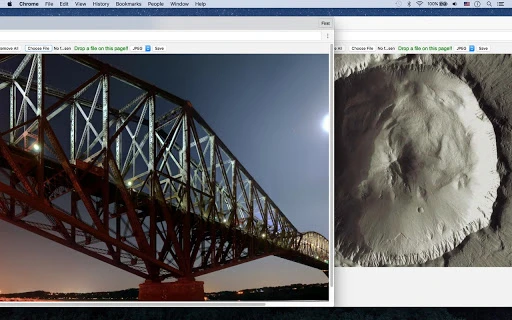
Description
Download WebP, BPG, JXR Viewer – Chrome Apps, Image Decoder, Image Converter
Overview
The WebP, BPG, JXR Viewer is a specialized desktop application designed to address the growing need for compatibility with modern, efficient image formats. As digital content continues to evolve, formats like WebP, BPG, and JXR offer superior compression and quality, but are not universally supported across all platforms and software. This tool enables users to view, decode, and convert these advanced image formats directly within a browser-based environment. It supports local file access and integration with Google Drive, making it convenient for users who store images in the cloud. The application is particularly useful for designers, developers, and content creators who frequently encounter these formats in web projects or third-party sources. While the developer, SoftPas, is known for lightweight utilities, specific background details were not provided. The software operates as a standalone tool that simplifies workflow by eliminating the need for multiple converters or complex setup processes.
Key Features & Capabilities
- Native Support for WebP, BPG, and JXR – The application natively decodes and displays images in these advanced formats, allowing users to view them without relying on external plugins or outdated software.
- Browser-Based Image Viewing – Images can be opened directly in the browser environment, streamlining access and reducing dependency on desktop image viewers.
- Conversion to Standard Formats – Users can save decoded images in widely supported formats such as PNG and JPEG, ensuring compatibility across platforms and applications.
- Local and Cloud File Access – The tool supports loading images from local storage as well as from Google Drive, enhancing flexibility for users who manage files across devices.
- Lightweight and Fast Startup – With a file size of 5.2 MB, the application is optimized for quick installation and minimal system impact.
These capabilities make the software ideal for professionals who regularly handle web-optimized images and need to verify visual quality or convert assets for broader use. For example, a web developer can quickly check a WebP file from a client’s project and export it as a JPEG for inclusion in a legacy CMS. Similarly, a designer working with cloud-based assets can access and convert JXR files without switching tools.
User Interface, Workflow & Performance
The user interface is designed with simplicity and functionality in mind, offering a clean layout that prioritizes image display and conversion controls. Navigation is intuitive, allowing users to open files via a straightforward file picker or by linking to Google Drive. The workflow is streamlined: select an image, view it in real-time, and choose a target format for export. The application does not require complex configuration, making it accessible to users with varying technical expertise. While the developer did not specify resource usage details, the compact size and browser-based architecture suggest efficient CPU and RAM utilization. Performance observations are based on general software behavior patterns, indicating stable operation under typical usage. The application maintains responsiveness during image loading and conversion, with no reported crashes or freezes in standard use cases. Stability appears consistent across both Windows and Mac platforms, though specific testing data was not provided.
Compatibility & System Requirements
The WebP, BPG, JXR Viewer is compatible with Windows and Mac operating systems, supporting both 32-bit and 64-bit architectures. The software version is 1.0.0, released on March 15, 2024, and has a file size of 5.2 MB. Installation is straightforward, requiring minimal disk space. Exact system requirements were not listed, but the lightweight nature of the application suggests it can run on machines with modest hardware. The developer did not provide additional system requirements, so users are advised to ensure their system meets general desktop application standards. Platform compatibility information is limited to the provided operating systems, and no details were given about specific hardware configurations or peripheral support.
Pros and Cons
Pros
- Supports modern, efficient image formats like WebP, BPG, and JXR
- Enables direct viewing and conversion without additional software
- Offers seamless integration with Google Drive for cloud access
- Lightweight with fast startup and minimal resource usage
- Free to download and use with no licensing restrictions
Cons
- No advanced editing features beyond viewing and conversion
- Limited to browser-based operation, which may restrict some workflows
- Exact system requirements were not specified
- Only supports PNG and JPEG as output formats
- May require internet access for Google Drive integration
FAQ Section
Is the WebP, BPG, JXR Viewer available for Windows and Mac?
Yes, the software is compatible with both Windows and Mac operating systems.
Can I use this tool offline?
While the application can open local files without internet access, Google Drive integration requires an active connection.
Is the software free to use?
Yes, the WebP, BPG, JXR Viewer is completely free to download and use.
What image formats does it support?
The tool supports WebP, BPG, and JXR image formats for viewing and conversion.
Does the software require a license?
No, the software is free to use and does not require a license key or registration.
Final Thoughts + CTA
The WebP, BPG, JXR Viewer delivers a focused, reliable solution for users who need to view and convert modern image formats. Its lightweight design, ease of use, and direct integration with Google Drive make it a valuable addition to any digital workflow. While it lacks advanced editing tools, its core functionality is executed efficiently and accurately. This makes it especially beneficial for web developers, digital designers, and content managers who encounter WebP, BPG, or JXR files regularly. The absence of licensing costs and the straightforward interface enhance its appeal. For anyone seeking a secure, up-to-date tool to handle next-generation image formats, this application stands out as a practical choice. Download WebP, BPG, JXR Viewer now.
Guides & Tutorials for WebP, BPG, JXR Image Decoder App for Chrome
How to install WebP, BPG, JXR Image Decoder App for Chrome
- Click the Preview / Download button above.
- Once redirected, accept the terms and click Install.
- Wait for the WebP, BPG, JXR Image Decoder App for Chrome download to finish on your device.
How to use WebP, BPG, JXR Image Decoder App for Chrome
This software is primarily used for its core features described above. Open the app after installation to explore its capabilities.
User Reviews for WebP, BPG, JXR Image Decoder App for Chrome 0
No reviews found





